 Vietnamnet.vn

 Podcast



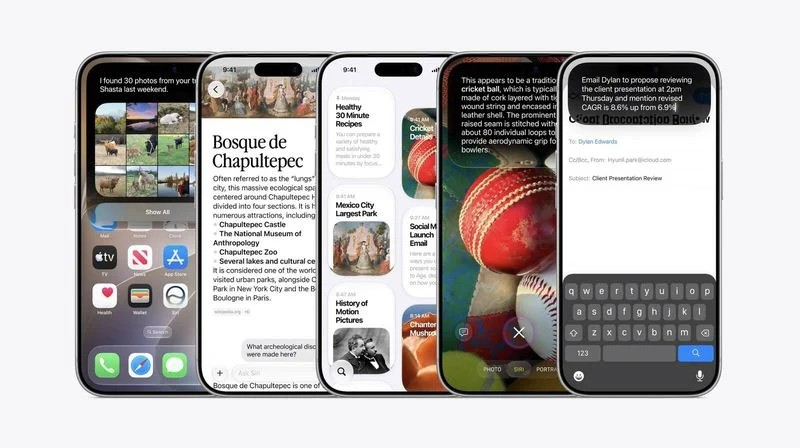
At last week’s launch event for the iPhone 18 Pro and iPhone Duo, Apple confirmed that iOS 27 would begin rolling out widely on Sept. 14.
Users can check for the update by going to Settings > General > Software Update.
iOS 27 is compatible with the iPhone 11 and newer models. However, Siri AI and some Apple Intelligence features require an iPhone 15 Pro or later.
Siri AI
The most notable addition in iOS 27 is a major upgrade to Apple’s voice assistant with a new version called Siri AI.
Traditional Siri works well for basic tasks such as setting timers or checking the weather but has often struggled with more complex requests.
Apple has designed Siri AI to behave more like an AI chatbot, allowing it to handle a wider range of questions and requests in a more natural way.
iOS 27 also introduces a dedicated Siri app. Users can still summon the assistant by pressing and holding the iPhone’s side button.
Because it relies on Apple Intelligence, Siri AI requires an iPhone 15 Pro or newer.
The assistant can use personal information stored on an iPhone, understand content displayed on the screen and perform a wider range of actions within supported apps.
At launch, Siri AI supports only English and comes with daily usage limits. Apple says it could offer expanded access through a paid option in the future.
More Apple Intelligence features
iOS 27 introduces several other AI-powered capabilities.
In the Photos app, Apple has added Extend and Reframe options, allowing users to expand images or adjust their composition using AI.
Image Playground can generate more realistic images, while Shortcuts allows users to create new shortcuts simply by describing what they want in natural language.
Apple has also added automatic video description generation for HomeKit Secure Video cameras, alongside several other AI features.
Refined Liquid Glass design
Apple introduced its Liquid Glass design language with iOS 26 and is refining the interface further in iOS 27.
According to Apple, the updated Liquid Glass provides more consistent refraction and improved contrast, while app icons appear sharper and more detailed.
iOS 27 also introduces a slider allowing users to adjust the transparency or coloring of the Liquid Glass effect.
Performance improvements
Speed and system responsiveness are another major focus of iOS 27.
Apple says apps can open up to 30% faster, while newly added images in the Photos library can load up to 70% faster.
AirDrop data transfers can be up to 80% faster.
Apple has also made a range of other optimizations intended to make everyday interactions with the iPhone more responsive.
iPhone Handoff
iOS 27 introduces iPhone Handoff, which allows users to switch between two iPhones while using the same phone number on both devices.
The feature requires carrier support and may carry an additional fee.
T-Mobile in the US and Deutsche Telekom in Germany will be the first carriers to support iPhone Handoff.
T-Mobile plans to charge $5 per month for the service.
Verizon in the US and EE in the UK say they will add support later this year, with the feature expected to expand to more carriers afterward.
More control over location sharing in Find My
Find My in iOS 27 gives users greater control over how long they share their location.
Users can choose a custom duration, such as five days and six hours, or specify the exact date and time when location sharing should end.
They can also temporarily pause location sharing with a particular person until the end of the day without notifying that person.
Apple says the feature could be useful in situations where users want to keep something secret, such as preparing a surprise birthday party for a family member.
In iOS 26 and earlier versions, Find My offered only three fixed options: sharing indefinitely, until the end of the day or for one hour.
CarPlay supports video apps
Apple previously announced plans to let users watch video on a vehicle’s display via AirPlay when the car is stationary.
According to developer documentation released at WWDC 2026, CarPlay video support is available for compatible new vehicles.
When playing video from an iPhone app that supports AirPlay, users can select their vehicle’s display from the AirPlay menu and watch the content on the in-car screen.
With iOS 27, Apple is also allowing developers to create CarPlay apps that let users browse and search for videos directly through the CarPlay interface.
The feature is designed for times when a vehicle is parked, such as while waiting at an airport or charging an electric car.
For safety reasons, video can only be played when the vehicle is parked.
CarPlay video support is expected to roll out gradually across new compatible vehicle models.
Du Lam
.svg)
