 Vietnamnet.vn

 Podcast



Scams involving fraudulent messages or criminals impersonating government agencies and banks are becoming increasingly sophisticated.
Traditional security measures often struggle to intervene when victims are psychologically manipulated into transferring money themselves or providing personal information.
Impersonation Risk Detection in iOS 27 is designed to operate as a system-level layer of protection.
It can alert users and supported third-party apps when unusual activity is detected, before sensitive information or money is transferred.
Unlike security tools that require extensive access to personal data, Apple's new feature uses a privacy-focused architecture.
When users perform sensitive actions in supported apps, such as making bank transfers, completing high-value payments or changing important security settings, the app can ask iOS 27 to assess the level of risk.
The system analyzes interaction timing, behavioral patterns, context and on-device sensor data to determine whether a user may be acting under manipulation by a scammer.
The assessment produces three risk levels:
Unknown: No unusual data is detected, or the user's actions are consistent with their normal behavior.
Medium: Some minor unusual activity is detected.
High: The system detects clear signs of outside interference or suspected fraudulent activity.
Apple says the system does not read or analyze content in Messages, Mail or Photos.
Apps receive only the final risk score, which can be used to trigger preventive measures such as requiring additional authentication, temporarily delaying a transaction or displaying an urgent warning.
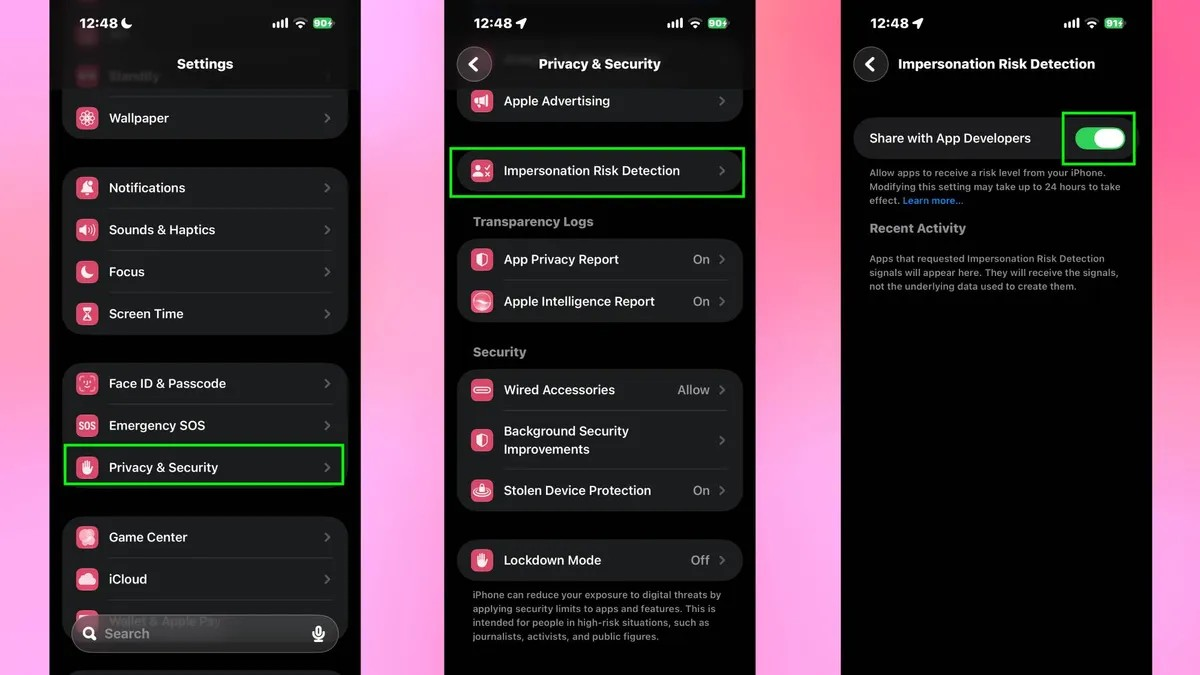
Because the mechanism requires limited event signals to be shared with app developers and system diagnostic servers, Apple has chosen to disable the feature by default when users upgrade to iOS 27. Users must activate it manually in Settings.
To enable the feature, open Settings on the iPhone, select Privacy & Security, scroll down to Impersonation Risk Detection, and turn it on.
Apple says that once enabled, the system may take up to 24 hours to fully activate its protective signals across compatible apps.
After activation, users can return to the same section and check Recent Activity to see which apps have requested risk assessments and which actions triggered warnings.
Du Lam
.svg)
